The Marketer chat
The Marketer is where you ask for things. Type what you want, in plain words, and it makes it in your brand's voice.
Open it
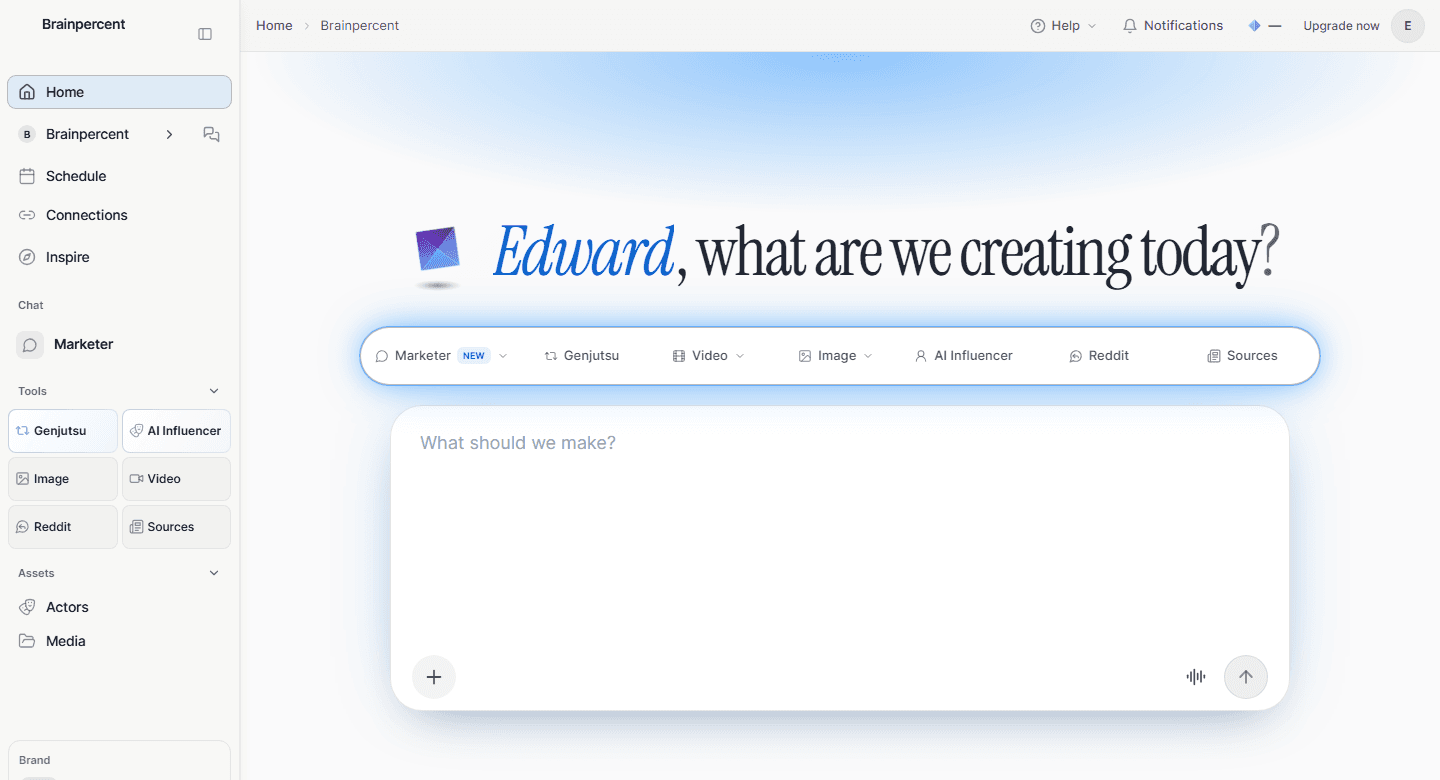
Choose Marketer in the left sidebar. The home screen greets you with what are we creating today? and one big box that says What should we make?Above the box are shortcuts: Marketer, Genjutsu, Video, Image, AI Influencer, Reddit and Sources.
Ask for things
You do not need special words. These all work.
| Say something like | What you get |
|---|---|
| Write a LinkedIn post announcing our new pricing | One post for one channel, in that channel’s style. |
| Make a 5-slide Instagram carousel explaining how we help solo founders | A carousel, designed slide by slide. |
| Write a blog article about why solo founders struggle with content | A full article with headings, in your voice. |
| Create an image of our product on a clean studio background | One on-brand image. |
| Make a 10 second video of our product in use | A short video clip. |
| Give me 5 content ideas | Ideas for your business to pick from. |
| Schedule the posts that are ready | Puts ready posts on your calendar. |
On an empty chat, the starting points are Turn a link into a post, Give me ideas, Write an article, My connected channels, How I post and Schedule what is ready. Choose More ideas for more.
Add a link, a photo or a file
Click the + button, labelled Add photos, files and more. You can add Photos, take one with the Camera, paste a Link, pick something from Assets or choose Edit video. The microphone starts a voice call.
Prices and approvals
Anything that costs credits stops and asks first. You see a card called Needs your confirmation with the cost, and two buttons.
- DetailsOpens what will be made, if you want to check it.
- ConfirmRuns it now. The card changes to Confirmed. Running it now.
- CancelNothing runs and nothing is charged.
A card that sits too long expires. Ask again and you get a fresh one. Long jobs say Still working. This can take a few minutes. You can leave the page and come back.
While it works
You can keep typing. Your next message waits in a small queue under the box. Choose Steer now to add it to the answer in progress, or leave it and it sends after. You can also Edit or Remove a queued message.
On any reply you can Copy reply, Regenerate it, or mark it a good or bad response. If a reply stops early, choose Continue your reply.
Where your work goes
- Media keeps your images and videos. Open it from the sidebar.
- The content tabs next to the chat list what the Marketer made: Videos, Posts, Articles and Sources.
- History lists your chats. Start a new one with New chat, or rename and delete old ones.
Chat limits
Open Chat usage in the sidebar to see the Current session and the Weekly limit, with the time each one resets. A session lasts five hours and the week lasts seven days.
| Your plan | What chat costs |
|---|---|
| Free | No credits. 30 Marketer messages a week. |
| Paid subscription | No credits. Fair-use session and weekly limits. |
| Lifetime deal | Credits, as you go. Before you send, the box says Chat uses credits based on usage, and credits are set aside until the reply finishes. Unused credits come back. |
Making things is separate from chatting. Images, videos, articles and posts use credits on every plan. See How credits work.
What it remembers
Tell the Marketer a standing rule, such as Always draft social posts in Hebrew or Give me short, direct answers, and it applies it to every reply in every workspace. You can see and remove these under Personalization. It also learns lasting facts about your brand as you work. You never have to manage that, and you can remove anything it learned.